Display
The 240×240 ST7789 needs a SPI bus, a backlight, fonts, a QR payload, and two pages. Home Assistant gets a Display switch to turn the panel on or off.
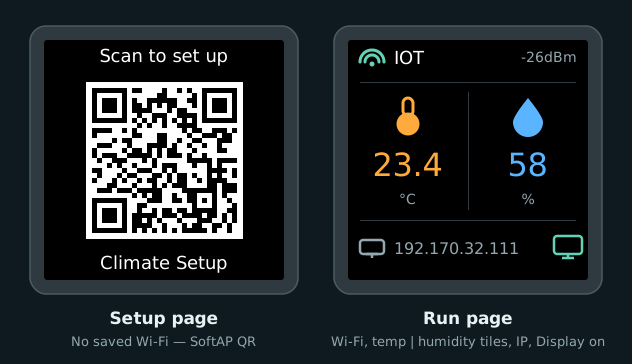
Mock-up from the display code: SoftAP QR, then Wi‑Fi status, side-by-side temp / humidity tiles, IP, and a display-on cue.
Pins
| Signal | GPIO | Set in | Wired in |
|---|---|---|---|
| SCK / SCL | 12 | spi |
Display (checkpoint 4) |
| MOSI / SDA | 11 | spi |
same |
| CS | 10 | display |
same |
| DC | 9 | display |
same |
| RST | 7 | display |
same |
| BL | 21 | output |
same |
Silk on the module may say SCL or SCK for the clock — same net.
SPI bus
spi:
  clk_pin: GPIO12
  mosi_pin: GPIO11
Backlight and Display switch
output:
  - platform: ledc
    id: backlight_pwm
    pin: GPIO21

light:
  - platform: monochromatic
    id: backlight
    output: backlight_pwm
    internal: true
    restore_mode: ALWAYS_OFF

switch:
  - platform: template
    name: Display
    id: tft_enable
    icon: mdi:monitor
    optimistic: true
    restore_mode: RESTORE_DEFAULT_ON
    turn_on_action:
      - light.turn_on:
          id: backlight
          brightness: 100%
    turn_off_action:
      - light.turn_off: backlight
| Key | What it does |
|---|---|
ledc output |
PWM on GPIO21 for the backlight |
light (internal) |
Drives brightness; not shown in Home Assistant |
switch Display |
On/off in Home Assistant — turns the TFT backlight fully on or off |
RESTORE_DEFAULT_ON |
Remembers the last Display state; defaults to on |
Fonts and QR
font:
  - file: "gfonts://Roboto@500"
    id: font_big
    size: 36
  - file: "gfonts://Roboto"
    id: font_text
    size: 18

qr_code:
  - id: setup_qr
    value: "WIFI:S:${ap_ssid};T:WPA;P:${ap_password};;"
| Piece | Role |
|---|---|
font_big (36) |
Temperature and humidity values |
font_text (18) |
Labels and SSID / IP |
font_mdi / font_mdi_lg |
Material Design Icons (status row + large climate icons) |
setup_qr |
Standard Wi‑Fi QR from the same ap_ssid / ap_password as the hotspot |
Roboto is downloaded at compile time (needs internet once), then baked into the firmware.
Pages
page_setup draws the SoftAP QR. page_run is the connected dashboard — Wi‑Fi strength, two climate tiles (thermometer / humidity), IP, and a monitor icon that matches the Display switch when the panel is on. Full lambdas live in firmware/climate.yaml.
| Setting | What it does |
|---|---|
update_interval: 2s |
Redraw every two seconds |
invert_colors: true |
Matches this 240×240 module — flip if colours look wrong |
| First page in the list | Default is readings; boot logic shows QR only when no home Wi‑Fi is saved |
wifi_info text sensors |
Feed SSID and IP into page_run |
wifi_signal |
Feeds dBm and picks the strength icon |
| Page | Draws |
|---|---|
page_setup |
QR icon, "Scan to set up", SoftAP QR, hotspot name |
page_run |
Wi‑Fi strength + SSID + dBm; temp | humidity tiles; IP + display-on icon |
Wi‑Fi setup chooses the page at boot and on connect / disconnect (QR only when unprovisioned).
Next: Factory reset